


PhiApp
3.836.00 Reviews
App Specs
- Version
- 4.8.5-production
- Updated On
- License
- Free
- Downloads
- 500,000+
- Developer
- PhiAcademy GmbH
- Categories
- Beauty
- Platform
- Android, iOS
Screenshots
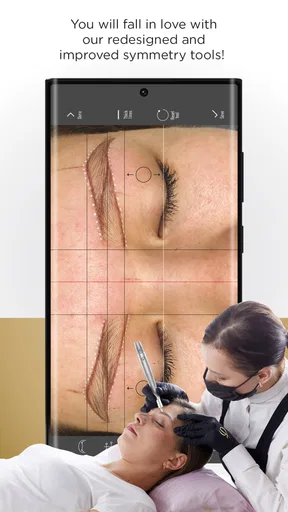

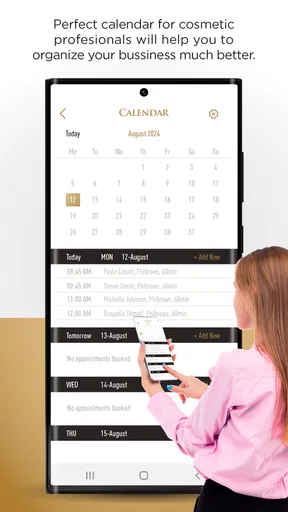
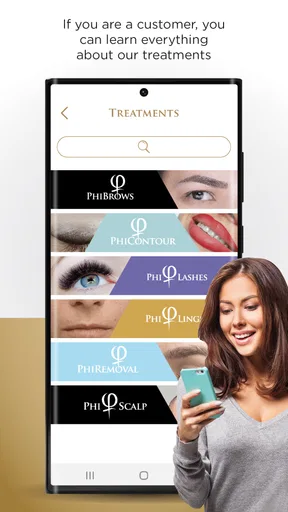
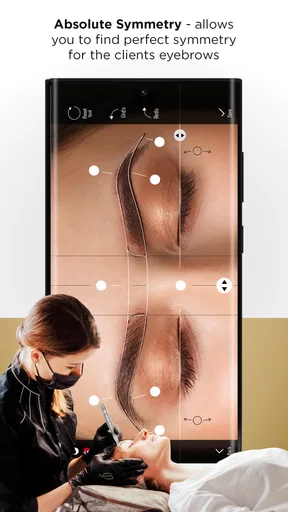
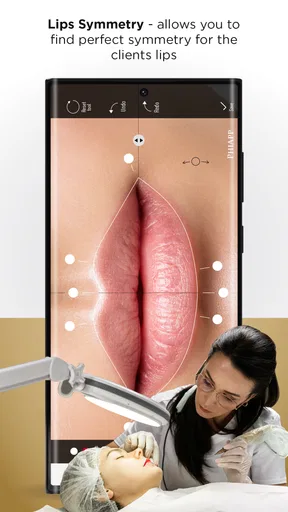
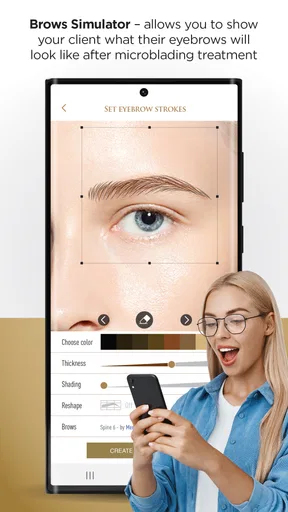
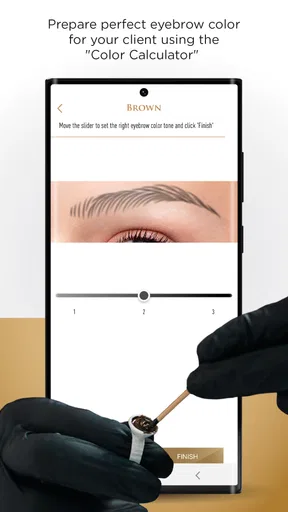
 Analysis by AppCompare
I use beauty apps very differently from general productivity tools: I want a clear path to useful learning, not another place to manage chores. PhiApp is a beauty-focused app from PhiAcademy GmbH, and that distinction matters when deciding whether it belongs on your phone. Its name suggests a compact companion to the academy’s beauty world, but I would approach it as a specialized option rather than assume it is a broad salon booking tool or an all-purpose makeover editor.
What to expect from a beauty-learning companion
The appeal of a focused beauty app is that it can make it easier to keep related material together while you explore a subject. If you are a beauty professional, student, or simply someone curious about the field, that focus may be more useful than a general lifestyle app full of unrelated content. I would start by identifying what I want to learn or look up, then judge the app by whether it helps me return to that material without fuss.
That approach also sets realistic expectations. A beauty app is not automatically a substitute for hands-on instruction, product testing, or professional judgement. If you are learning a technique, use digital material as a reference and practise carefully; do not treat an on-screen explanation as proof that a procedure is suitable for every person or situation. For clients seeking a service, the app’s beauty focus alone should not be mistaken for a way to book an appointment or evaluate a provider.
Where it can fit into an ordinary day
A realistic use case is a beauty professional checking a topic during a quiet gap between appointments, then returning to it later when planning their next learning session. A student could use the same kind of short window to keep study connected to a specific beauty interest instead of searching through unrelated social posts. I find this sort of focused reference most useful when I already have a question in mind; it is less compelling if I expect an app to invent a complete learning plan for me.
One practical habit is to keep a short list of questions before opening a specialist app: which technique do I want to understand, what terminology is unfamiliar, and what do I need to revisit? That makes browsing purposeful and helps reveal whether the material is genuinely useful to your work. It also prevents the common trap of collecting tips without building a coherent understanding.
How it compares with general beauty alternatives
Compared with broad beauty and lifestyle apps, a specialist product can feel more relevant if its subject matches your interests, while general alternatives may offer a wider mix of inspiration, shopping, social content, or everyday beauty advice. Those broader options can be better when you want variety or a casual browse. I would choose a focused app when depth and a clear beauty context matter more than having everything in one feed.
The trade-off is that a narrow focus can leave gaps. If you mainly want to compare products, save looks, watch a wide range of creators, or find local services, a dedicated shopping, social, or booking option may suit you better. Before making PhiApp part of a professional routine, I would check whether its content and tools match the exact tasks I need rather than relying on its category alone.
Worth Reading Before You Choose

EA SPORTS FC Mobile 26 Is a Bigger Football Game, but It Takes Time

Flipboard Shows What News Apps Must Do Beyond the Feed

Switching to Android Auto Means Rethinking Your Driving Routine

Google Calendar Makes a Crowded Week Easier to Manage

Ludo King Makes the Most of the Minutes Between Plans

Baby Panda World Brings Quick Play to Modern Phones, but Its Game Library Feels Busy
Who is likely to get the most from it
I can see this being most relevant to people who already have an interest in beauty education and want a mobile companion for that interest. Someone new to the subject may appreciate a dedicated starting point, while an experienced practitioner may value having a specialized resource close at hand. The strongest reason to try it is a genuine need for beauty-related material, not a general desire to organize a busy day.
On the other hand, I would skip it if I were looking for a universal beauty toolkit, a social network, a salon appointment manager, or a replacement for in-person training. Those are different jobs, and a specialist app should not be expected to cover them all. It is also sensible to consider whether you will use a dedicated learning resource often enough to justify keeping another app installed.
Getting Started with PhiApp
First things first, downloading PhiApp is a breeze. Available on both Android and iOS, it took me just a few taps to get it up and running. Once installed, the app walks you through a simple setup process. I was pleasantly surprised by how intuitive it was. No complicated sign-ups or unnecessary permissions here – just straight to the point.
Awesome Features at Your Fingertips
PhiApp is packed with features, and let me tell you, they’re quite impressive. One of my favorites is the smart task organizer. It's like having a digital to-do list that not only keeps you on track but also adapts to your daily habits. I found that it suggested times for tasks based on when I was most productive, which was a real game-changer for me.
Another feature I love is the collaborative workspace. Whether you're working with colleagues or planning a trip with friends, this feature lets you share tasks and projects seamlessly. I used it to coordinate a family event, and it was a breeze to assign tasks and set deadlines. Everyone stayed in the loop, and there were no more "I forgot" moments.
User Experience: Smooth and Sleek
PhiApp shines in the user experience department. The interface is sleek and modern, yet simple enough that even a tech newbie could navigate it without a hitch. I appreciated the color-coded categories and the ability to customize the layout to fit my needs. It made everything visually appealing and easy to understand.
The notifications are another aspect worth mentioning. They're subtle yet effective, reminding you of what needs to be done without being intrusive. I found myself actually looking forward to these gentle nudges throughout the day.
Integration and Customization
This app plays well with others, too. If you’re like me and use a handful of different apps to manage your life, you’ll appreciate how PhiApp integrates with popular services like Google Calendar and Dropbox. Syncing my calendar was a cinch, and it ensured that I was always on top of my schedule.
Customization is another area where PhiApp excels. I was able to tweak settings to suit my workflow, from changing themes to setting priority levels for tasks. It felt like the app was tailored just for me, which is something you don’t often find.
Wrapping It Up
In conclusion, PhiApp is a fantastic tool for anyone looking to boost productivity and manage tasks more effectively. Its intuitive design, thoughtful features, and seamless integration make it a standout choice in a crowded market.
Whether you’re juggling work, home duties, or planning your next big adventure, this app has got you covered. If you haven’t already, give it a try and see how it can transform your daily routine. Trust me, once you start using PhiApp, you'll wonder how you ever managed without it!
Speed, stability, and heavier sessions
For a beauty-focused app, speed matters most when I need to find a specific piece of information quickly, not when I am trying to squeeze every second out of a complex editing workflow. I would judge the experience by whether it opens reliably, whether moving between sections feels straightforward, and whether I can pick up where I left off. I would not assume it needs powerful hardware simply because it sits in the beauty category; the practical test is how it behaves on the device I plan to use.
Heavier use is likely to mean longer browsing or study sessions rather than a single quick check. If I were using it between clients, I would avoid starting an unfamiliar setup process in the middle of a busy day. I would first explore the app when I have a few quiet minutes, work out where the material I care about is located, and then use those short breaks for targeted lookups. That small bit of preparation is a better safeguard against wasted time than expecting any app to make a rushed moment effortless.
Reliability is also about how well an app fits a routine. I would not make a critical appointment or client decision depend on an app being available at precisely the right moment. For learning and reference, it is sensible to keep personal notes on important points and revisit them when you have time to concentrate. If a screen seems slow or stops responding, closing and reopening the app is a reasonable first step; I would avoid repeatedly tapping controls, which can make it harder to tell whether the app has registered an action.
Device fit, cost, and a sensible first try
The Android release requires version 8.0 or later, so anyone using an older device should check compatibility before planning around it. PhiApp is free to install, and the age rating is Everyone, but in-app purchases range from $7.49 to $69.99 per item. I would treat that as a reason to explore the free experience first and make a purchase only after confirming that the relevant content or capability is something I will actually use. The app has a 3.8 average from around 1,100 ratings, which gives a prospective user a useful broad signal, not a guarantee that the experience will match their needs.
Its current release is 4.8.5-production, and it has been available since March 13, 2015. More than 100,000 installs suggest that it has reached a meaningful audience, though popularity alone does not tell me whether it suits a particular beauty specialty. I would check the app’s current screens and available material against my own goals before paying for anything. That is especially worthwhile for professionals, who may need a precise topic or workflow rather than a general beauty resource.
My practical verdict
For someone who wants a beauty-centered companion and is willing to explore what it offers, this is a reasonable app to try without an upfront purchase. I would give it a chance when I had a clear learning or reference need, then decide based on how quickly I could reach useful material and whether I returned to it in ordinary working or study sessions. The best way to assess it is not to install it and browse aimlessly, but to test it against one real question you want answered.
I would choose another option if my priority were broad inspiration, product discovery, booking, or direct instruction that requires personal feedback. Those needs call for different tools, and no beauty app should be treated as a substitute for professional training or sound judgement. But when its particular content aligns with what I am trying to learn, the focused approach can be more practical than scrolling a general-purpose beauty feed. My recommendation is cautious but positive: start free, explore with a specific purpose, and spend only if the app proves useful in your own routine.
Pros
- User-friendly interface enhances navigation.
- Highly customizable settings for personalization.
- Regular updates with new features.
- Seamless integration with other apps.
- Efficient performance with low battery usage.
Cons
- Limited offline functionality available.
- Occasional bugs in older devices.
- Premium features locked behind paywall.
- Requires constant internet connection.
- Ads can be intrusive at times.
FAQs for PhiApp
What platforms is PhiApp available on?
PhiApp is available for both Android and iOS devices. Users can download it from the Google Play Store for Android devices and the Apple App Store for iOS devices. Ensure that your device meets the minimum OS requirements to run the app smoothly and enjoy all its features.
Is PhiApp free to use?
PhiApp offers a free version with the basic features accessible to all users. However, there are also premium features available through in-app purchases or a subscription model. These premium features enhance the user experience by providing additional functionalities and content that are not available in the free version.
What permissions does PhiApp require?
PhiApp may request access to certain permissions on your device, such as location, camera, and contacts, depending on its functionality. These permissions help the app provide a personalized and optimized experience. It's crucial to review these permissions during installation and adjust them according to your privacy preferences.
How can I troubleshoot issues with PhiApp?
If you encounter issues with PhiApp, you can try restarting the app or your device, checking for updates, or clearing the app cache. If the problem persists, contact their customer support through the app or their official website for further assistance. It's helpful to provide detailed information about the issue when reaching out for support.
Does PhiApp have a community or support forum?
Yes, PhiApp typically has a community or support forum where users can interact, share tips, and discuss experiences. This platform is a valuable resource for troubleshooting, learning new features, and connecting with other users. Check the app’s official website or within the app for links to these community resources.


